Solutions for Every Underground Challenge
Real problems from real contractors, and how Bore-ON handles each one.
What Each Tool Actually Covers
Most tools own one slice of the job. Bore-ON runs the whole thing, and this table is honest about where the others are strong.
| Capability | Bore-ON | Bore-log apps | Enterprise GIS | Enterprise EPC |
|---|---|---|---|---|
| Live map of trucks + installed coverage | — | Partial | Partial | |
| 811 tickets tracked per job + on the map | — | — | Partial | |
| Drop management (import → install → redline) | — | — | Partial | |
| As-built logging on the map | Partial | — | ||
| Receipts + card reconciliation | — | — | — | |
| Truck GPS + maintenance | — | — | — | |
| Priced + usable for a 5-50 person contractor | — | — | ||
| Built by a working contractor | Partial | — | — |
● Full · Partial · — None. Comparisons reflect each category's typical focus; individual products vary.
"I'm Always Calling the Field for Updates"
It's 2 p.m. and you still don't know which crews finished, which are behind, or what actually got installed today. So you start calling and texting foremen — pulling them off the work just to ask how it's going.
The Typical Outcome:
- Foremen interrupted all day for status updates
- The office is always a step behind what's actually happening
- Decisions get made on stale information
- Nobody has a single picture of the whole day
Visibility for Everyone
Management opens the app and sees the whole job live — without nagging the people doing the work.
Who is on which job today, with their supervisor, foreman and crewmates, on one screen.
Live position for every truck with a tracker, and driver scores from Linxup trips.
Installed footage and completion update on the map as crews log work in the field.
Result: the office sees the day without the phone calls.
Management gets the full picture by opening the app, and crews stay focused on the work.
811 Tickets, Read and Plotted
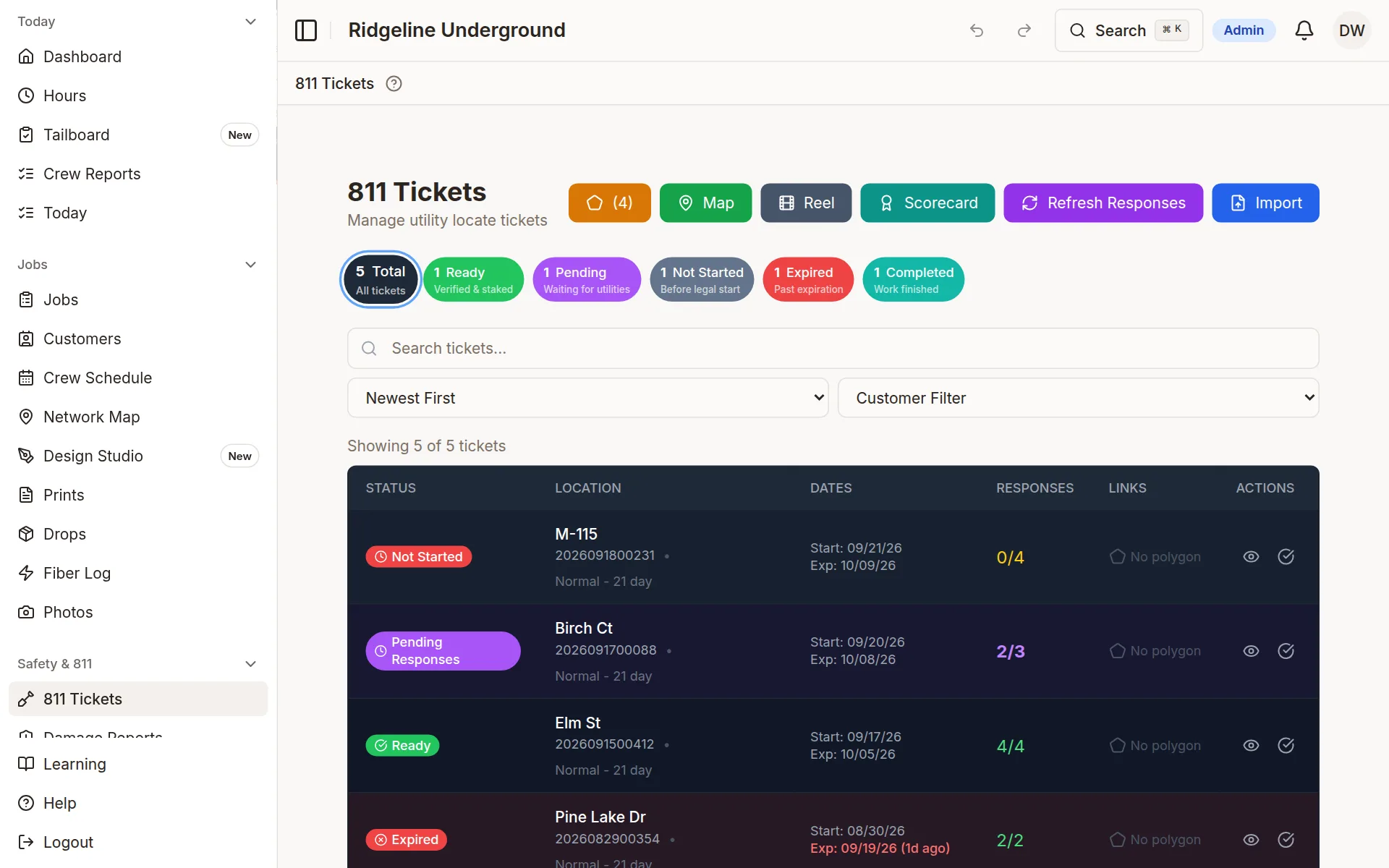
Upload a Michigan 811 ticket PDF and it is read for you; other states import from Excel. The dig area is drawn on your project map and every job it covers shows its dig status.
Ticket number, dates, utility responses and contact details are read from Michigan caller-confirmation and positive-response PDFs.
The ticket's dig area is drawn over your project map (pulled automatically for Michigan tickets, drawn by hand otherwise), and the ticket lists each utility's response.
Days to expiration on every ticket, and a do-not-dig status on any job whose ticket has lapsed.
Result: the crew sees the job's dig status before they start.
Ticket links, and any override to dig without a clear ticket, are recorded with who and when.
Sample company data
"We Hit a Gas Line—Ticket Was Expired"
Your foreman didn't realize the 811 ticket expired 3 days ago. Crew hit a gas line. Now you're facing fines, emergency response costs, regulatory investigation, and potential liability.
The Typical Outcome:
- Thousands in fines and emergency response costs
- Work stoppage on entire project
- Weeks of regulatory paperwork and investigation
- Damaged relationship with customer and utilities
- Insurance rates increase
"The Install Crew Never Got the Drop Sheet"
A batch of drops comes in as one big PDF. By the time a crew is standing at the house, nobody can find the sheet for that specific drop — so the install stalls or the redline goes in wrong.
The Typical Outcome:
- Crews wait while someone digs for the right sheet
- Drops get installed without the right information
- Redlines come back incomplete or missing
- Sheets scattered across email, texts, and folders
Drop Management
Import a batch of drop sheets and every drop keeps its own sheet — ready for the install and the redline, all on the map.
Split a batch PDF and attach each sheet to its own drop automatically.
Crews open the drop's sheet, complete the install, and redline right from the phone.
See which drops are done and which are still pending on the project map, for every drop with a location.
Result: The right sheet is always on the right drop.
No more hunting through a giant PDF — crews and the office work from the same organized set of drops.
Reel-Level Material Tracking
Conduit and fiber tracked by reel. Usage checked against installed footage. Waste calculated, by job and crew.
Crew enters start and end footage. It is compared to the segment; short readings, or more than 40 feet over, are flagged before saving.
Every pull off a reel is logged to the job and segment it went into, so you know which project used which material.
Waste is calculated for you, with waste percentage by job and by crew.
Result: you can see where the material went.
Installed, wasted or still on the reel, by job and by crew, from the readings your crews enter.
"2,000 Feet of Conduit Just Disappeared"
You ordered 5 reels of 2" HDPE conduit. Your crew logged 8,000 feet installed. But the reels had 10,000 feet total. Where did the other 2,000 feet go? Theft? Waste? Wrong job site?
The Typical Outcome:
- $1,200+ in lost material (at $0.60/ft for 2" HDPE)
- Can't determine if it was theft, waste, or logged to wrong project
- Crew accountability impossible without data
- Happens on multiple projects monthly
See How Bore-ON Solves Your Problems
These are not hypothetical. They are everyday headaches on underground jobs, and we had every one of them.